How to Create a Speaker One-Sheet for Free (Template Inside)
How to create a speaker one-sheet for free: a real example, the 10 blocks every one-sheet needs, a free PDF template and step-by-step instructions.
A speaker one-sheet is a single page that tells an event planner who you are, what you speak about, why audiences love you and how to book you. You can create one for free in about an hour: write ten short blocks (headshot, name, promise, proof numbers, bio, talks, testimonials, logos, logistics and a booking call to action), then lay them out on one page in Canva, Google Docs or any free design tool. Below is a complete speaker one-sheet example you can copy, a free PDF template, the anatomy of each block and the mistakes that get one-sheets ignored. A speaker website on Speakerfolio gives you the same information as a live page planners can share.
Key takeaways
- One page, one job. A speaker one-sheet helps a planner say yes, or pass you to their boss, in under a minute.
- Ten blocks cover everything: headshot, name, promise, proof, bio, talks, testimonials, logos, logistics and a booking call to action.
- Write for the planner, not for you. Lead with what changes for their audience.
- Free tools are enough. Canva, Google Docs or our free PDF template will do the job.
What is a speaker one-sheet?
A speaker one-sheet (also called a speaker sheet or speaker one-pager) is a one-page summary of you as a speaker. It's the document you attach to a pitch email, hand to an organiser at an event, or send when a planner asks "do you have something I can share with my team?"
Here's a complete speaker one-sheet example. Amara Okafor is the demo speaker from our Trainer website template, and this is what her one-sheet looks like:
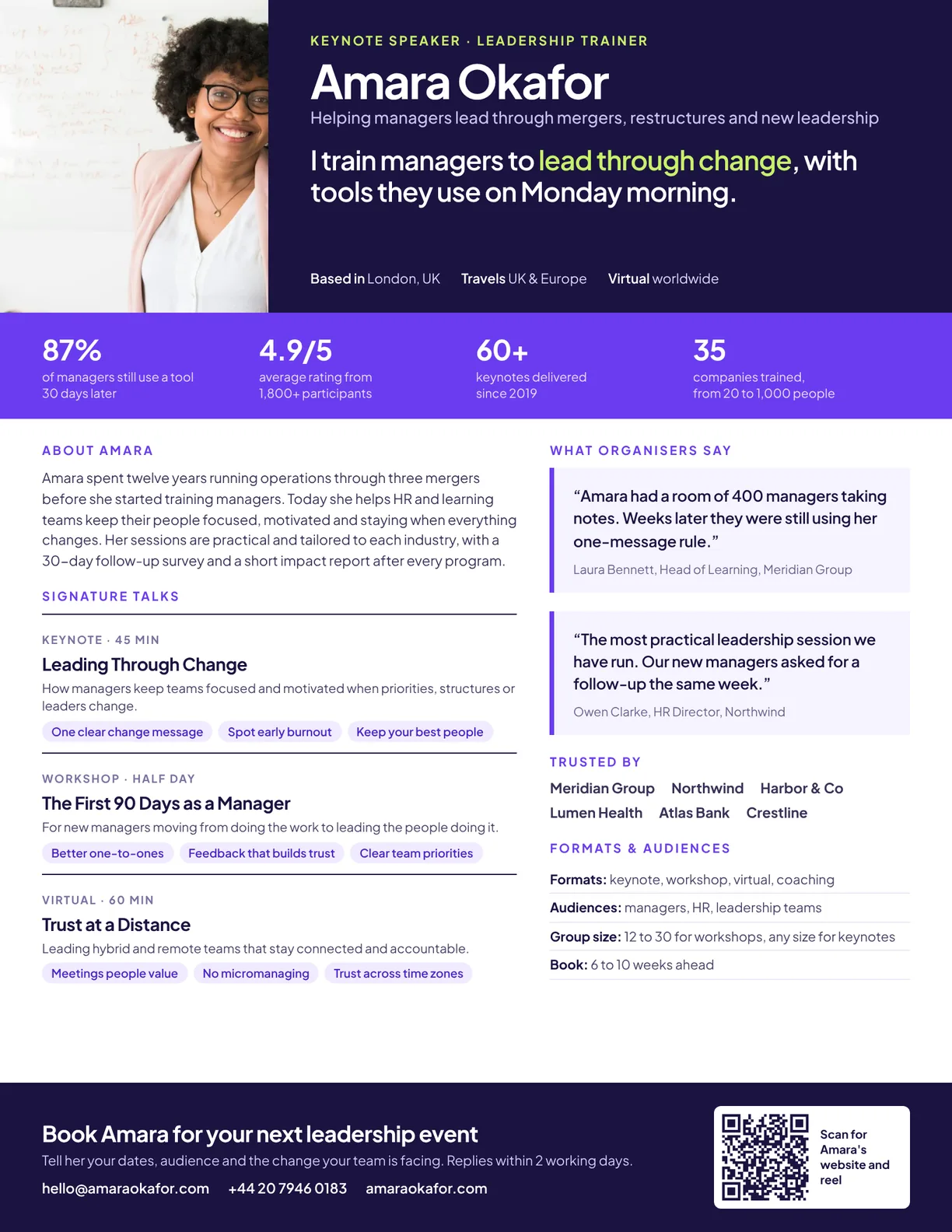
A complete speaker one-sheet on US Letter size. Click it to open the free PDF template.
Everything a planner needs is on that page: who she is, what she speaks about, proof that she's good, who has booked her, what formats she offers and how to get in touch. Nothing is there that a planner wouldn't use.
Speaker one-sheet vs speaker website vs media kit
People often mix these up. Each one does a different job:
| Speaker one-sheet | Speaker website | Media kit / press kit | |
|---|---|---|---|
| Length | One page | One or more web pages | Several pages or a folder |
| Format | PDF or print | Live web page | PDF, ZIP or web page |
| Main reader | Event planners and their bosses | Planners, attendees, media | Journalists and event marketing teams |
| Main job | Get you shortlisted and forwarded | Get you found and booked | Help others promote you |
| Includes video? | A link or QR code | Your full reel, embedded | Links and files |
| When you use it | Pitch emails, events, follow-ups | Search, social, every email signature | After you're booked |
You need a one-sheet and a website. The one-sheet travels: it gets attached, printed and forwarded inside a company. The website is where the planner goes when they want to see more, especially your video.
Why event planners still ask for a speaker one-sheet
Planners rarely book a speaker alone. A conference organiser runs ideas past a committee. An HR manager has to get a director to sign off. A one-sheet is the thing they forward with "what do you think of this person?"
That's why a good speaker one-sheet:
- Stands on its own. Someone who has never heard of you should understand it without your pitch email.
- Scans in 30 seconds. Headings, short lines, numbers and white space.
- Looks professional. It reflects on the planner who forwards it.
- Makes the next step obvious. Email, phone and a link to your reel are easy to find.
If your one-sheet does those four things, it's working for you in meetings you'll never see.
The anatomy of a speaker one-sheet: 10 blocks
Here's the same example with each block numbered. The sections below explain what goes in each one and how to write it.
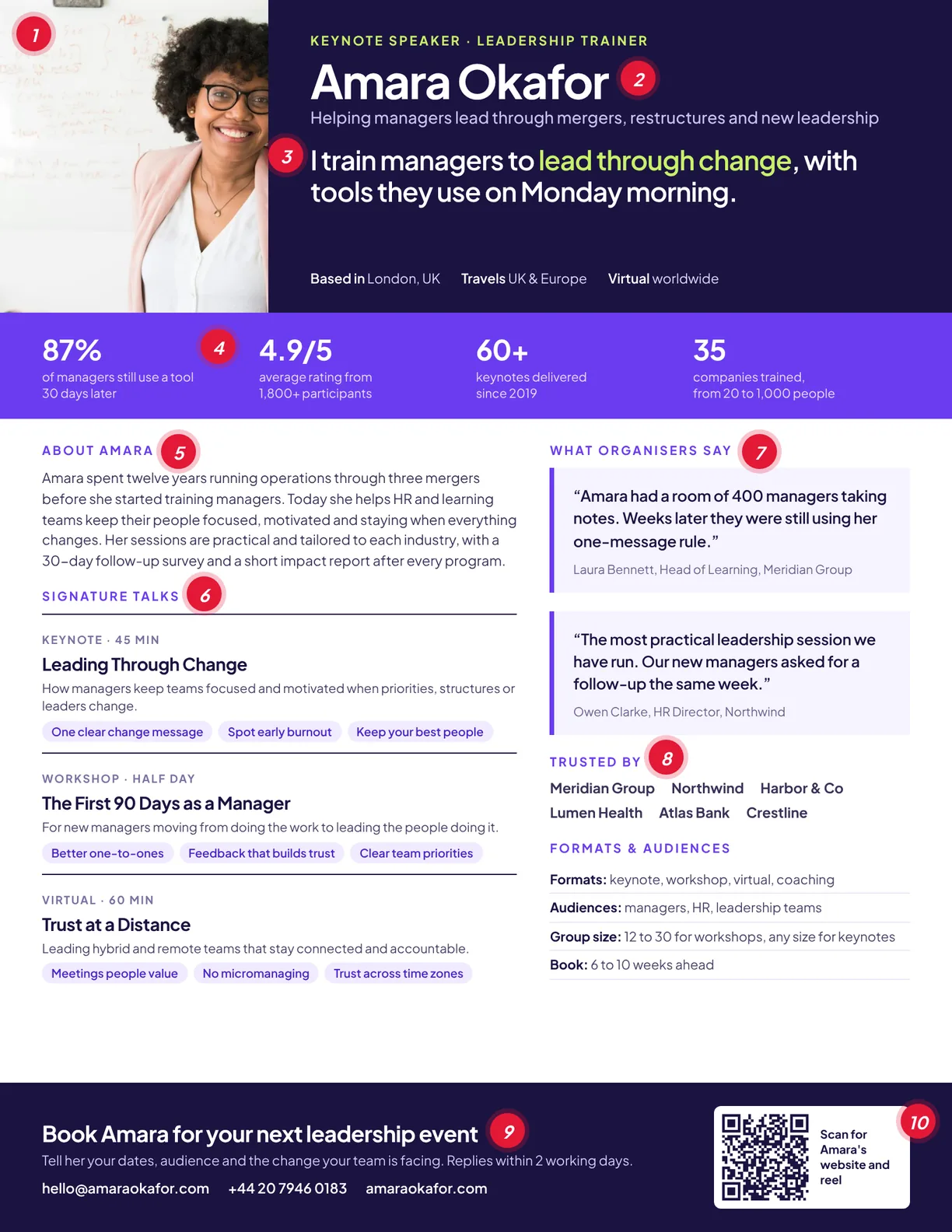
The ten blocks of a speaker one-sheet, numbered in the order a planner reads them.
1. A professional headshot
Use a recent, well-lit photo where your face is clear. It should look like you on the day you walk on stage. A natural, friendly expression works better than a stiff corporate portrait. If you have a good photo of you speaking, you can use it here or add it as a second image.
Tip: put the photo at the top, where the eye lands first. It turns a document into a person.
2. Your name and role
Your name, big. Under it, a short line about what you do and for whom: "Keynote speaker · Leadership trainer" plus a line like "Helping managers lead through mergers, restructures and new leadership."
Avoid a long list of titles. "Author, coach, consultant, speaker, podcaster, entrepreneur" tells the planner nothing about what you'll do for their audience.
3. Your one-line promise
This is the most important sentence on the page. It tells the planner what changes for their audience after your talk.
Compare:
| Weak | Strong |
|---|---|
| "Award-winning leadership speaker" | "I train managers to lead through change, with tools they use on Monday morning." |
| "Inspiring audiences worldwide" | "I help sales teams handle rejection and close more deals the same quarter." |
| "Passionate about wellbeing" | "I show nurses how to protect their energy on 12-hour shifts." |
The strong versions name the audience, the change and a result. Write ten versions of your promise and pick the one a planner could repeat to their boss.
4. Proof numbers
Three or four numbers you can stand behind, in a band across the page. Good options:
- Talks or keynotes delivered
- People reached
- Average session rating
- Companies or organisations you've worked with
- A result your audiences get (like "87% still use a tool 30 days later")
- Years of experience in your field
Use real numbers only. If a planner asks where a figure comes from, you should have an answer.
5. A short bio
60 to 100 words, written in the third person, focused on why you're credible on this topic. Skip your full career history. A planner needs to know what qualifies you and what you do now.
A simple structure: your relevant experience in one sentence, who you help today in one sentence, and how you work (or what makes your sessions different) in one sentence. Our guide on how to write a speaker bio planners can use has examples at different lengths.
6. Signature talks
Two or three talks, each with:
- Format and length: "Keynote · 45 min" or "Workshop · Half day"
- A title people would repeat: "Leading Through Change," not "Change Management Keynote"
- One sentence on what the talk is about
- Three short takeaways
This is the block planners read most closely, because it tells them whether you fit their theme. Three talks is the maximum. If you have more, put the rest on your website.
7. Testimonials
One or two short quotes from people who booked you, with full names, roles and organisations. "Laura Bennett, Head of Learning, Meridian Group" is convincing. "A happy client" isn't.
The best testimonials mention a specific result: "Weeks later they were still using her one-message rule." If you don't have quotes like that yet, our guide on how to ask for testimonials right after an event will help.
8. Logos, formats and logistics
Two small blocks that answer practical questions before the planner has to ask:
- Trusted by: five or six organisations you've spoken for, as names or logos (only with permission for logos).
- Formats and audiences: keynote, workshop, virtual, panel; who you speak to; group sizes; where you're based and where you travel; how far ahead to book.
Fees are optional. Many speakers leave them off the one-sheet and discuss them per event, or add "Fees from..." if they want to filter out small budgets.
9. A clear call to action
A short line telling the planner what to do next, with your contact details: "Book Amara for your next leadership event," then email, phone and website. Put it at the bottom, where people finish reading, in a contrasting band so it stands out.
Add how quickly you reply ("Replies within 2 working days"). It's a small detail that makes you look easy to work with.
10. A QR code or link to your video
A one-sheet can't play video, but it can send people to it. Add a QR code that opens your speaker reel or website, with a label like "Scan to watch the speaker reel." On a PDF, also make your website address a clickable link.
Don't have a reel? Our guide on how to make a speaker reel from footage you already have walks through it.
Free speaker one-sheet template
Here's a fill-in template you can copy into any document or design tool. Replace each line with your own details, using the examples as a guide. Keep each block as short as it is here.
| Block | What to write | Example |
|---|---|---|
| 1. Headshot | Recent, well-lit, friendly | A smiling photo in front of a whiteboard |
| 2. Name and role | Your name, plus "Keynote speaker · your field" and one line on who you help | Amara Okafor · Keynote speaker, leadership trainer · Helping managers lead through change |
| 3. Promise | One sentence: audience + change + result | "I train managers to lead through change, with tools they use on Monday morning." |
| 4. Proof numbers | 3 or 4 numbers with short labels | 87% still use a tool 30 days later · 4.9/5 rating · 60+ keynotes · 35 companies |
| 5. Bio | 60 to 100 words, third person | Twelve years running operations through three mergers... |
| 6. Talks | 2 or 3 talks: format, title, one line, three takeaways | Keynote · 45 min · Leading Through Change |
| 7. Testimonials | 1 or 2 quotes with full name, role, organisation | Laura Bennett, Head of Learning, Meridian Group |
| 8. Logos and logistics | 5 or 6 clients; formats; audiences; location and travel; booking lead time | Formats: keynote, workshop, virtual · Based in London, travels UK and Europe |
| 9. Call to action | One line + email, phone, website + reply time | Book Amara for your next leadership event · Replies within 2 working days |
| 10. QR code | Links to your reel or website | "Scan to watch the speaker reel" |
Download the free speaker one-sheet template: speaker one-sheet PDF template (US Letter, 1 page). Use it as a layout guide and rebuild it with your own content in Canva or Google Docs.
How to create a speaker one-sheet for free, step by step
Step 1: Gather your content
Before you open any design tool, collect everything in one document:
- Your best headshot and, if you have one, a stage photo
- Your promise, written ten ways, with the best one picked
- Three or four proof numbers
- A 60 to 100 word bio
- Two or three talks with takeaways
- One or two testimonials with full names and roles
- A list of organisations you've spoken for
- Formats, audiences, location, travel and contact details
- The link to your reel or website
Writing the content first is the step most speakers skip, and it's why so many one-sheets end up with gaps filled by vague phrases.
Step 2: Pick a free tool
| Tool | Good for | Cost |
|---|---|---|
| Canva | Design-led layouts, ready templates, easy PDF export | Free plan works |
| Google Docs | Simple, clean layouts, easy to update | Free |
| Microsoft Word | Familiar, good with tables and columns | Often already installed |
| Adobe Express | Quick designs with brand colours | Free plan works |
| Figma | Full design control, if you already use it | Free plan works |
Canva is the easiest choice for most speakers. Search its template library for "speaker one-sheet" or "one-pager" and choose a simple layout, or start blank and copy the structure from our example.
Step 3: Set up the page
- Size: US Letter (8.5 × 11 in) for North America, A4 elsewhere. If you speak internationally, Letter or A4 both print fine on the other.
- Margins: at least 0.4 inches (about 10 mm) so nothing gets cut off when printed.
- Grid: a header band across the top, then two columns. Talks and bio on the wider left column, proof and logistics on the right.
- Colours: one main colour and one accent, ideally the same as your website.
- Fonts: one font family, two or three sizes. Headlines around 24 to 40 pt, body text 10 to 12 pt.
Step 4: Lay out the ten blocks
Place the blocks in reading order: headshot, name and promise across the top; proof numbers as a band underneath; bio and talks on the left; testimonials, logos and logistics on the right; call to action and QR code in a band at the bottom.
Leave white space between blocks. A crowded one-sheet looks like you couldn't decide what mattered.
Step 5: Add your QR code and links
Create a QR code that links to your speaker reel or website. Most design tools have a free QR code feature (Canva has one built in). Test it with your phone before you export. Then make your email and website clickable in the PDF.
Step 6: Proofread and test
- Read every line out loud. Cut anything that doesn't help a planner decide.
- Check names, titles and organisations in testimonials.
- Print it once. Things that look fine on a screen can be too small on paper.
- Open the PDF on your phone. Many planners will.
- Ask someone who doesn't know your work to read it for 30 seconds, then tell you what you speak about. If they can't, rewrite your promise and talks.
Step 7: Export and name the file
Export as a PDF, ideally under 2 MB so it doesn't get blocked by email filters. Name it clearly: "Amara-Okafor-Speaker-One-Sheet.pdf," not "final-v3.pdf." The file name is the first thing a planner sees in their downloads.
How to use your speaker one-sheet
A one-sheet only works if you use it. Good places:
- Pitch emails: attach it, but put your promise, one talk and your reel link in the email body too. Many planners won't open attachments from people they don't know.
- Follow-ups: after a call, send it so the planner can forward it internally.
- Events: bring a few printed copies when you speak, and hand them to organisers in the audience.
- Your website: add a "Download one-sheet" link or button next to your booking form.
- Speaker directories and bureaus: some ask for one when you apply.
- LinkedIn: add it to the Featured section of your profile.
Update it every few months: new numbers, a fresh testimonial, a new talk. An out-of-date one-sheet is a quiet sign that you're not speaking much.
Common speaker one-sheet mistakes
- Cramming in everything. Your whole CV, every talk you've ever given, five testimonials. Pick the best and cut the rest.
- No promise. The page says who you are but not what changes for the audience.
- Tiny text. Anything under 9 pt is hard to read when printed.
- Anonymous testimonials. Without names, they look made up.
- No link to video. Planners want to see you speak. Make it one scan or click away.
- A busy background. Photos or patterns behind text make it harder to read.
- Only a PDF. A one-sheet is a summary. Planners still need somewhere to go for more.
Your speaker website is your one-sheet online
A one-sheet gets you forwarded. A speaker website gets you booked. When a planner scans your QR code or clicks your link, they should land on a page that tells the same story with more room: your full reel, more testimonials and a booking form.
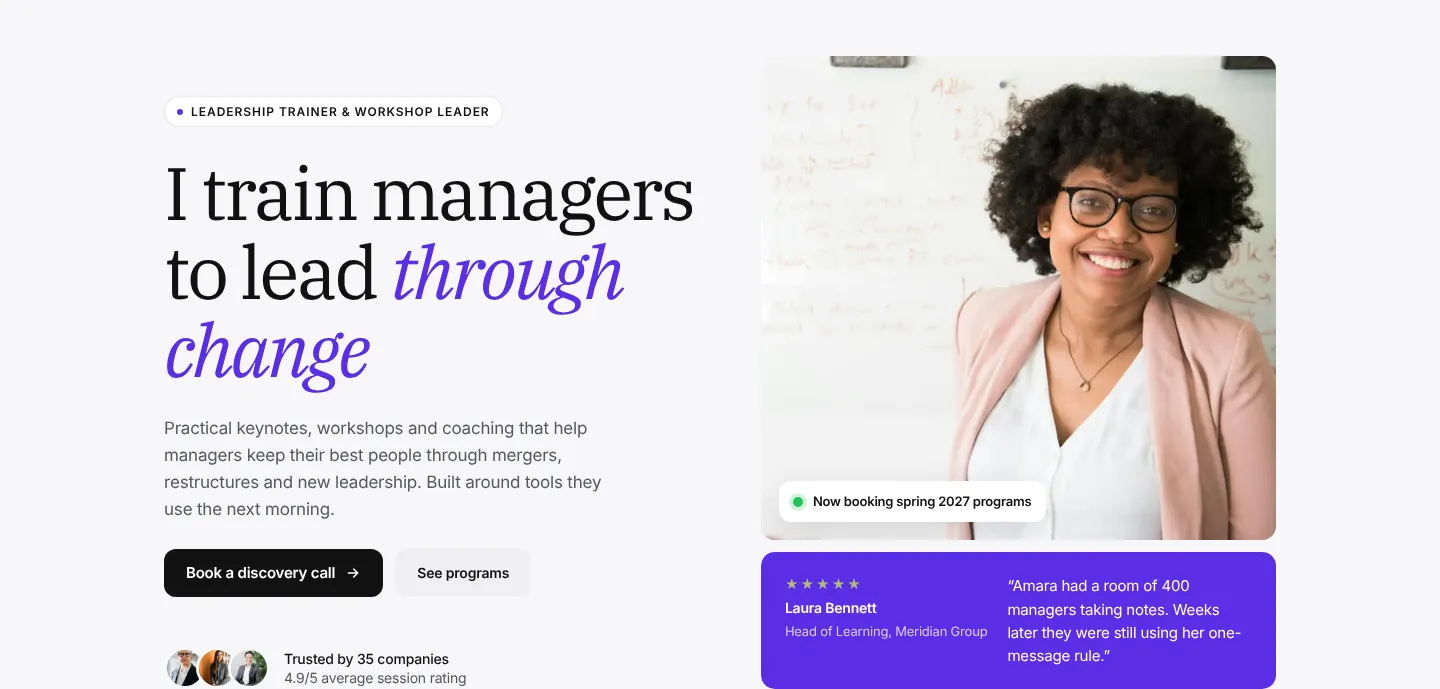
The same speaker on her website: the same promise, photo, proof and testimonial as her one-sheet, with a booking button. This is the Speakerfolio Trainer template.
Notice how the website and the one-sheet match: the same photo, the same promise, the same rating, the same testimonial. That consistency builds trust. A planner who opens your website after reading your one-sheet should feel like they're seeing the same person in more detail.
For more ideas on what that page can look like, see our keynote speaker website examples.
Get your speaker website free with Speakerfolio
Speakerfolio writes and builds a free one-page speaker website from your LinkedIn profile, on yourname.speakerfolio.com. It covers everything your one-sheet does and more: your promise, story, talks, speaker reel, testimonials and a booking form. You also get a profile in the Speakerfolio speaker directory, where event planners search by topic and format.
- Free: any of six templates, built for you, usually within two working days
- No commission: booking requests go straight to your inbox
- Premium ($100 a year): your own domain, a custom design and more pages, with hosting and updates included
Put your Speakerfolio link on your one-sheet and behind your QR code, and the two will work together: one gets you forwarded, the other gets you booked.
Frequently asked questions
What is a speaker one-sheet?
A speaker one-sheet is a one-page document that summarises you as a speaker: your photo, promise, proof, bio, talks, testimonials, clients, formats and contact details. Event planners use it to shortlist speakers and share options with their team.
What should be on a speaker one-sheet?
A speaker one-sheet should include a headshot, your name and role, a one-line promise, three or four proof numbers, a short bio, two or three signature talks, one or two named testimonials, client names, formats and logistics, a call to action with contact details and a QR code or link to your reel.
How do I make a speaker one-sheet for free?
Write your content first, then use a free tool like Canva, Google Docs or Word. Set up a one-page Letter or A4 layout, place the ten blocks in reading order, add a QR code to your reel, proofread, and export a PDF under 2 MB.
Should I include my speaking fee on my one-sheet?
It's optional. Many speakers leave fees off and discuss them per event. If you want to filter out small budgets, add "Fees from..." in the logistics block.
How long should a speaker one-sheet be?
One page. If you need more space, your content is too long. Move the extra detail to your speaker website and link to it.
What size should a speaker one-sheet be?
US Letter (8.5 × 11 inches) in North America and A4 in most other countries. Both print fine on either paper size if you keep margins of at least 0.4 inches.
Is a speaker one-sheet the same as a media kit?
No. A one-sheet is a single page for planners deciding whether to book you. A media kit is longer and helps journalists and event marketing teams promote you after you're booked.
Make your one-sheet this week
A speaker one-sheet isn't hard to make. Write your promise, pick your best numbers and talks, add named proof and a clear way to book you, and fit it all on one clean page. Download the free speaker one-sheet PDF template to see the layout, build yours in Canva or Google Docs, and send it with your next pitch. Then point it to a page that gets you booked: get your free speaker website from Speakerfolio.

Saleh is a UI/UX and web designer with more than five years of experience and the founder of Speakerfolio, where he builds websites that help speakers get booked. He specialises in conversion-focused design and on-page SEO.
Connect on LinkedInRelated articles
All articles